Better Data Assets
The problem
A UDataAsset is great for storing plain data, but it falls short as soon as you want inheritance: you can’t make a child Data Asset that inherits its values from a parent and only overrides a few of them.
Blueprints do support that, since every child Blueprint inherits the defaults of its parent. So instead of a Data Asset, we can create a data-only UObject class and let designers make Blueprints of it. We then reference those Blueprints with a TSoftClassPtr and read the values from the class default object (CDO).
The only thing missing is a nice workflow: a dedicated asset type in the Add menu, with its own name and color, that opens in the simple data-only Blueprint editor. That’s what this post builds.
What we’ll create:
| Class | Module | Purpose |
|---|---|---|
UMyDataObject |
Runtime | The actual data |
UMyDataObjectBlueprint |
Runtime | The Blueprint type that wraps our data class |
UMyDataObjectFactory |
Editor | Creates new assets from the Add menu |
FAssetTypeActions_MyDataObject |
Editor | Name, color and category of the asset in the editor |
Modules
We split the logic into a Runtime and an Editor module. Everything that has to do with the actual data goes into the runtime module; everything that has to do with creating and displaying the asset in the editor goes into the editor module. This way no editor code ends up in a packaged game.
YourPlugin.uplugin
{
  "FileVersion": 3,
  "Version": 1,
  "VersionName": "1.0",
  "FriendlyName": "YourPlugin",
  "Description": "Data-only Blueprint assets.",
  "Category": "",
  "CreatedBy": "Xander",
  "CanContainContent": false,
  "Installed": false,
  "IsBetaVersion": false,
  "Modules": [
    {
      "Name": "YourRuntimeModule",
      "Type": "Runtime",
      "LoadingPhase": "Default"
    },
    {
      "Name": "YourEditorModule",
      "Type": "Editor",
      "LoadingPhase": "Default"
    }
  ]
}
The editor module needs
UnrealEd,Kismet,KismetCompiler,AssetToolsand your runtime module in its.Build.csdependencies.
The data class
This is the data we want designers to fill in. It goes into the runtime module.
UCLASS(Abstract, BlueprintType, Blueprintable, EditInlineNew, CollapseCategories, NotPlaceable, meta = (DontUseGenericSpawnObject, DataOnly))
class YOURRUNTIMEMODULE_API UMyDataObject : public UObject
{
    GENERATED_BODY()

public:
    UPROPERTY(EditAnywhere, BlueprintReadOnly)
    FVector MyVector;

    // Instanced sub-objects work too (UMyDataFragment is any UObject class marked EditInlineNew)
    UPROPERTY(EditAnywhere, BlueprintReadOnly, Instanced)
    TArray<TObjectPtr<UMyDataFragment>> Fragments;
};
A quick overview of the specifiers:
Abstract— you can’t use the base class directly, only Blueprints of it.EditInlineNew— instances can be created inline in the details panel.DataOnly— hints that Blueprints of this class should only hold data, no logic.
Creating a custom asset for it
Blueprint wrapper
Every Blueprint asset is a UBlueprint. By creating our own UBlueprint subclass, the editor can tell our assets apart from regular Blueprints and treat them differently.
This also goes into the runtime module, because the asset class has to exist in a packaged game too.
// The Blueprint type that is used for Blueprints of UMyDataObject
UCLASS()
class YOURRUNTIMEMODULE_API UMyDataObjectBlueprint : public UBlueprint
{
    GENERATED_BODY()

public:
#if WITH_EDITOR
    // Hide this Blueprint type from the default "Blueprint Class" factory, we have our own factory
    virtual bool SupportedByDefaultBlueprintFactory() const override
    {
        return false;
    }
#endif
};
Blueprint factory
A UFactory tells the editor how to create a new asset. Ours creates a Blueprint with UMyDataObject as its parent class, wrapped in a UMyDataObjectBlueprint.
This goes into the editor module.
UCLASS(HideCategories = Object, CollapseCategories)
class UMyDataObjectFactory : public UFactory
{
    GENERATED_BODY()

public:
    UMyDataObjectFactory(const FObjectInitializer& ObjectInitializer);

    // The type of Blueprint that will be created
    UPROPERTY(EditAnywhere)
    TEnumAsByte<EBlueprintType> BlueprintType = BPTYPE_Normal;

    // The parent class of the created Blueprint
    UPROPERTY(EditAnywhere)
    TSubclassOf<UMyDataObject> ParentClass;

    virtual UObject* FactoryCreateNew(UClass* Class, UObject* InParent, FName Name, EObjectFlags Flags, UObject* Context, FFeedbackContext* Warn, FName CallingContext) override;
    virtual UObject* FactoryCreateNew(UClass* Class, UObject* InParent, FName Name, EObjectFlags Flags, UObject* Context, FFeedbackContext* Warn) override;
};
#include "Kismet2/KismetEditorUtilities.h"
#include "KismetCompilerModule.h"
#include "Misc/MessageDialog.h"

#define LOCTEXT_NAMESPACE "MyDataObjectFactory"

UMyDataObjectFactory::UMyDataObjectFactory(const FObjectInitializer& ObjectInitializer)
    : Super(ObjectInitializer)
{
    bCreateNew = true;      // Show up in the "Add" menu
    bEditAfterNew = true;   // Open the editor after creating the asset
    SupportedClass = UMyDataObjectBlueprint::StaticClass();
    ParentClass = UMyDataObject::StaticClass();
}

UObject* UMyDataObjectFactory::FactoryCreateNew(UClass* InClass, UObject* InParent, FName InName, EObjectFlags Flags, UObject* Context, FFeedbackContext* Warn, FName CallingContext)
{
    // Make sure we are trying to create our Blueprint type
    check(InClass->IsChildOf(UMyDataObjectBlueprint::StaticClass()));

    if (ParentClass == nullptr || !FKismetEditorUtilities::CanCreateBlueprintOfClass(ParentClass) || !ParentClass->IsChildOf(UMyDataObject::StaticClass()))
    {
        FFormatNamedArguments Args;
        Args.Add(TEXT("ClassName"), ParentClass != nullptr ? FText::FromString(ParentClass->GetName()) : LOCTEXT("Null", "(null)"));
        FMessageDialog::Open(EAppMsgType::Ok, FText::Format(LOCTEXT("CannotCreateBlueprint", "Cannot create a Blueprint based on the class '{ClassName}'."), Args));
        return nullptr;
    }

    UClass* BlueprintClass = nullptr;
    UClass* BlueprintGeneratedClass = nullptr;

    IKismetCompilerInterface& KismetCompilerModule = FModuleManager::LoadModuleChecked<IKismetCompilerInterface>("KismetCompiler");
    KismetCompilerModule.GetBlueprintTypesForClass(ParentClass, BlueprintClass, BlueprintGeneratedClass);

    return FKismetEditorUtilities::CreateBlueprint(ParentClass, InParent, InName, BlueprintType, UMyDataObjectBlueprint::StaticClass(), BlueprintGeneratedClass, CallingContext);
}

UObject* UMyDataObjectFactory::FactoryCreateNew(UClass* Class, UObject* InParent, FName Name, EObjectFlags Flags, UObject* Context, FFeedbackContext* Warn)
{
    return FactoryCreateNew(Class, InParent, Name, Flags, Context, Warn, NAME_None);
}

#undef LOCTEXT_NAMESPACE
Asset type actions
With FAssetTypeActions we define how the asset looks and behaves in the Content Browser: its name, its color, which category it shows up in, and which factory to use when a child Blueprint is created from it.
This goes into the editor module.
#include "AssetTypeActions/AssetTypeActions_Blueprint.h"

class FAssetTypeActions_MyDataObject : public FAssetTypeActions_Blueprint
{
public:
    virtual FText GetName() const override;
    virtual FColor GetTypeColor() const override;
    virtual UClass* GetSupportedClass() const override;
    virtual uint32 GetCategories() override { return EAssetTypeCategories::Blueprint | EAssetTypeCategories::Gameplay; }

    // Override this to do extra setup when the asset editor is opened
    // virtual void OpenAssetEditor(const TArray<UObject*>& InObjects, TSharedPtr<IToolkitHost> EditWithinLevelEditor = TSharedPtr<IToolkitHost>()) override;

    virtual UFactory* GetFactoryForBlueprintType(UBlueprint* InBlueprint) const override;

private:
    /** Returns true if the Blueprint is data only */
    bool ShouldUseDataOnlyEditor(const UBlueprint* Blueprint) const;
};
#include "Kismet2/BlueprintEditorUtils.h"

#define LOCTEXT_NAMESPACE "AssetTypeActions"

FText FAssetTypeActions_MyDataObject::GetName() const
{
    return LOCTEXT("AssetTypeActions_MyDataObjectBlueprint", "My Data Object Blueprint");
}

FColor FAssetTypeActions_MyDataObject::GetTypeColor() const
{
    return FColor::FromHex("#C9A0DCFF");
}

UClass* FAssetTypeActions_MyDataObject::GetSupportedClass() const
{
    return UMyDataObjectBlueprint::StaticClass();
}

UFactory* FAssetTypeActions_MyDataObject::GetFactoryForBlueprintType(UBlueprint* InBlueprint) const
{
    // Used when creating a child Blueprint: the new asset gets this Blueprint as its parent
    UMyDataObjectFactory* MyDataObjectFactory = NewObject<UMyDataObjectFactory>();
    MyDataObjectFactory->ParentClass = TSubclassOf<UMyDataObject>(*InBlueprint->GeneratedClass);
    return MyDataObjectFactory;
}

bool FAssetTypeActions_MyDataObject::ShouldUseDataOnlyEditor(const UBlueprint* Blueprint) const
{
    return FBlueprintEditorUtils::IsDataOnlyBlueprint(Blueprint)
        && !FBlueprintEditorUtils::IsLevelScriptBlueprint(Blueprint)
        && !FBlueprintEditorUtils::IsInterfaceBlueprint(Blueprint)
        && !Blueprint->bForceFullEditor
        && !Blueprint->bIsNewlyCreated;
}

#undef LOCTEXT_NAMESPACE
Since UE 5.2, Epic is moving from
IAssetTypeActionsto the newerUAssetDefinitionsystem. Asset type actions still work, but if you’re starting fresh on UE 5.2+ it’s worth looking atUAssetDefinition_Blueprintas a base class instead.
Registering the asset
We’ve created everything that’s needed; now we just have to tell Unreal: “Hey, this is an asset you can create.”
To do that, we register the asset type actions when the editor module starts up and unregister them when it shuts down. Add this to YourEditorModule.cpp:
#include "AssetToolsModule.h"

IMPLEMENT_MODULE(FYourEditorModule, YourEditorModule);

void FYourEditorModule::StartupModule()
{
    // TSharedPtr<FAssetTypeActions_MyDataObject> MyDataObjectAssetActions; is declared in the header
    MyDataObjectAssetActions = MakeShared<FAssetTypeActions_MyDataObject>();

    IAssetTools& AssetTools = FModuleManager::LoadModuleChecked<FAssetToolsModule>("AssetTools").Get();
    AssetTools.RegisterAssetTypeActions(MyDataObjectAssetActions.ToSharedRef());
}

void FYourEditorModule::ShutdownModule()
{
    // AssetTools may already be unloaded when the editor shuts down
    if (FModuleManager::Get().IsModuleLoaded("AssetTools") && MyDataObjectAssetActions.IsValid())
    {
        IAssetTools& AssetTools = FModuleManager::GetModuleChecked<FAssetToolsModule>("AssetTools").Get();
        AssetTools.UnregisterAssetTypeActions(MyDataObjectAssetActions.ToSharedRef());
    }

    MyDataObjectAssetActions.Reset();
}
Register the asset type actions only once. Registering the same actions twice results in duplicate entries in the Content Browser’s Add menu.
Final result
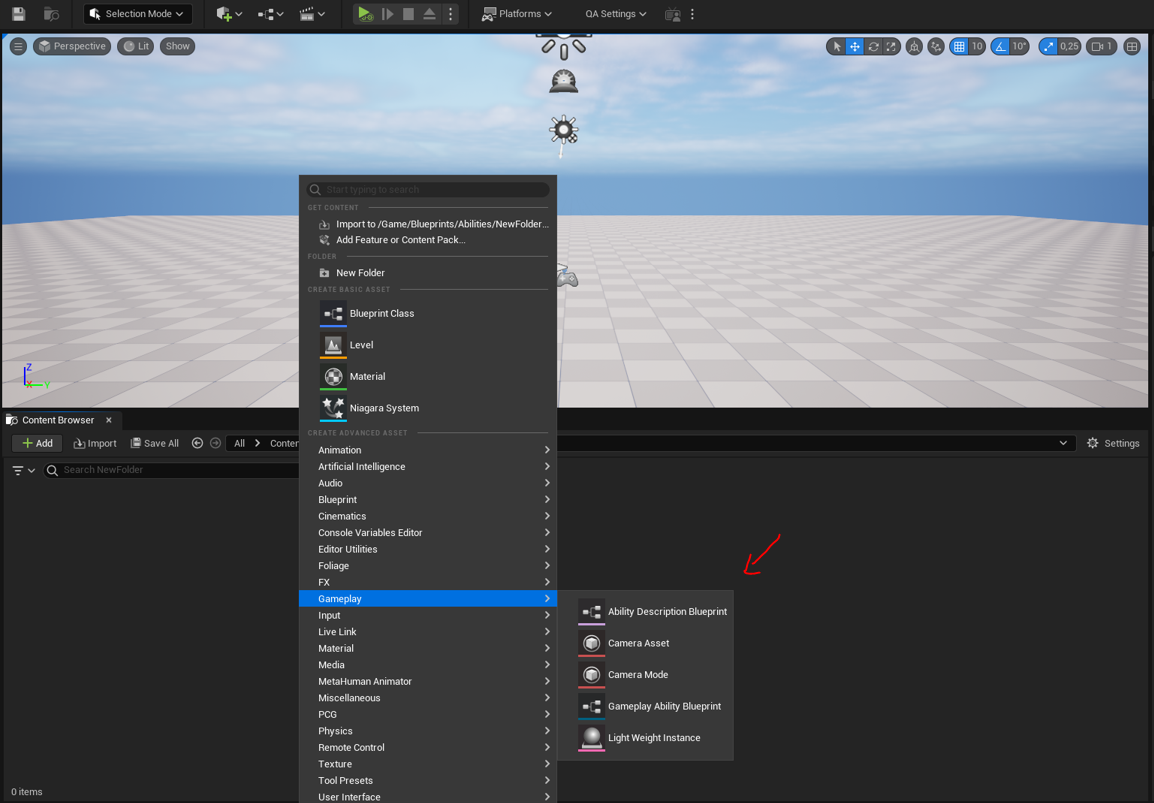
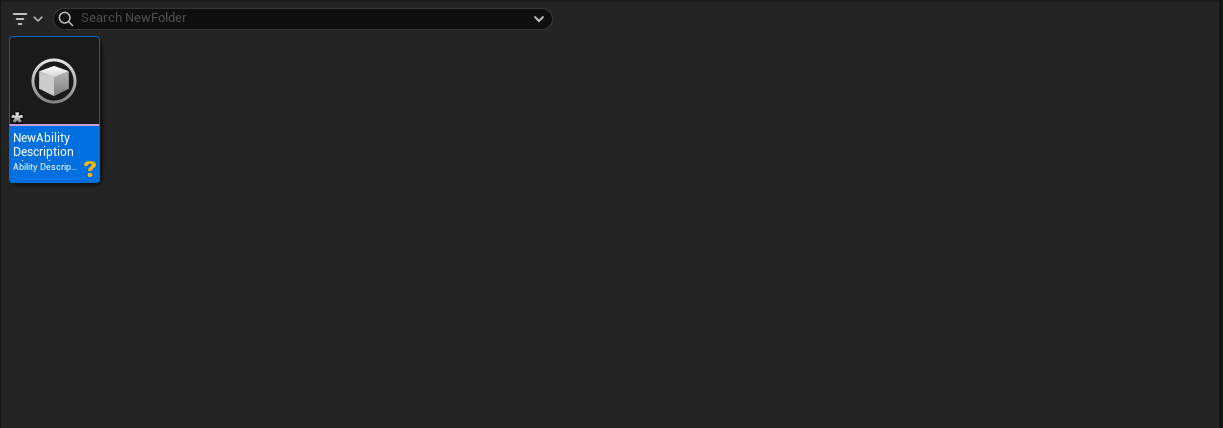
Tadaaa, we have a data-only UBlueprint asset that just holds a UObject. It has its own entry in the Add menu, supports inheritance, and supports instanced sub-objects.
Using the data
This can be really powerful for setting up data-oriented systems. Reference the assets with a TSoftClassPtr and read the values from the class default object:
UPROPERTY(EditAnywhere)
TSoftClassPtr<UMyDataObject> DataClass;

void UMyComponent::ReadData()
{
    if (UClass* LoadedClass = DataClass.LoadSynchronous())
    {
        const UMyDataObject* Data = GetDefault<UMyDataObject>(LoadedClass);
        UE_LOG(LogTemp, Log, TEXT("MyVector: %s"), *Data->MyVector.ToString());
    }
}
The class default object is shared. Treat it as read-only; if you need to modify the data at runtime, create an instance with
NewObject<UMyDataObject>(this, LoadedClass)instead.